

Key Quickstart Center
Get the most out of your new account and start banking with confidence.

Download the mobile app
Scan this code with your phone camera to download the mobile app.
Download the mobile app
Access and manage your account anytime, anywhere.


Fund Your Account
Adding money to your new account is simple. Transfer funds through online banking, use mobile check deposit, or visit a branch.
Set Up Direct Deposit
Use direct deposit to have paychecks sent securely to your account, and you could get paid up to two days sooner.3

Set Up Digital Wallet
Add your account to a mobile device for contactless in-store and online purchases with enhanced tokenization security.
Relationship Benefits
Earn special rates and discounts on eligible Key accounts when you make at least 5 qualifying transactions each month with your Key checking account.
Frequently Asked Questions
If ordered, debit cards will arrive in the mail within 5 – 7 business days after your initial deposit is made.
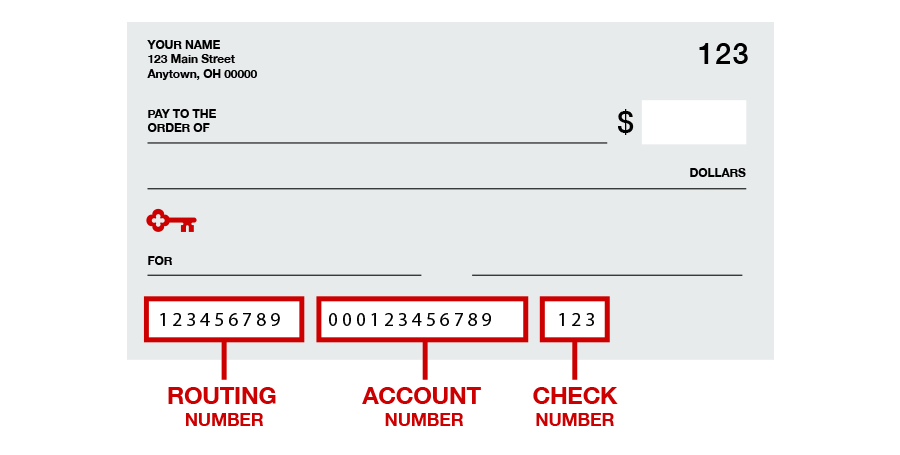
Order your checks easily in online and mobile banking; directly with KeyBank’s preferred check provider, Harland Clarke;4 online or by calling 1-800-355-8123; or by stopping in your local KeyBank branch. Please note that when placing a checkbook order directly with Harland Clarke, you will need your routing and account numbers.
You’ll find your KeyBank account and routing numbers in the Account Info and Settings menu when you log in to online or mobile banking and at the bottom of your paper checks.
There are several possible explanations. For example, restrictions may be in place due to missing data. Also, you may not have received your debit card yet. For troubleshooting assistance, call 1-800-KEY2YOU® (1-800-539-2968). Dial 711 for TTY/TRS. For more information, read our Online Banking FAQs.
External accounts you wish to transfer or pay to or from can be added by signing on to online banking and the mobile app, selecting Pay & Transfer, choosing External Transfer Accounts, and following the prompts. Then, from the Pay & Transfer menu, choose Make a Payment or Make a Transfer. You can set up same-day, future-dated, or recurring transfers in online banking and the mobile app.
Payments from other financial institutions may take a few days to process. Payments processed from Key using Bill Pay or funds transfer are guaranteed and process the same day. Credit cards take an extra day to be processed but will be backdated to the original date.
As part of our security measures, new clients may be unable to use Zelle for the first 10 days. To enroll in Zelle, sign on to online banking or the mobile app, select Zelle, and simply follow the prompts to enroll and get started.



1
Subject to terms and conditions in Service Agreement.
2
Message and Data rates may apply from your wireless carrier.
3
Early Pay is a service included with your KeyBank consumer deposit account in which KeyBank makes your eligible direct deposits available up to two business days early. Eligible direct deposits include certain transactions such as payroll, government benefits, or similar types of payments. The Early Pay service is dependent on when KeyBank receives information from the payer that the funds are on the way, this could vary, and you may not always receive your funds early. You cannot opt out of Early Pay.
4
KeyCorp is not affiliated with, maintained by, or in any way officially connected with Harland Clarke or any of its business units.
Zelle® and the Zelle®-related marks are wholly owned by Early Warning Services, LLC, and are used herein under license.
This card is issued by KeyBank N.A. pursuant to license by Mastercard International Incorporated.